Manage recoverable MT5 strategies and their stored broker evidence.
Workspace Dashboard inventories the strategy artifacts available to a selected MetaTrader source. It connects each recoverable definition with its stored MT5 backtest, broker history and workspace location so you can filter, inspect and continue working without searching folders manually.
Inventory the workspace See the active workspace, snapshots, recoverable definitions and stored backtests at a glance.
Filter broker evidence Search by name or symbol and apply reusable KPI clauses to stored MT5 results.
Continue from each card Open its board, inspect complete KPIs, locate its files or remove it through a guarded action.
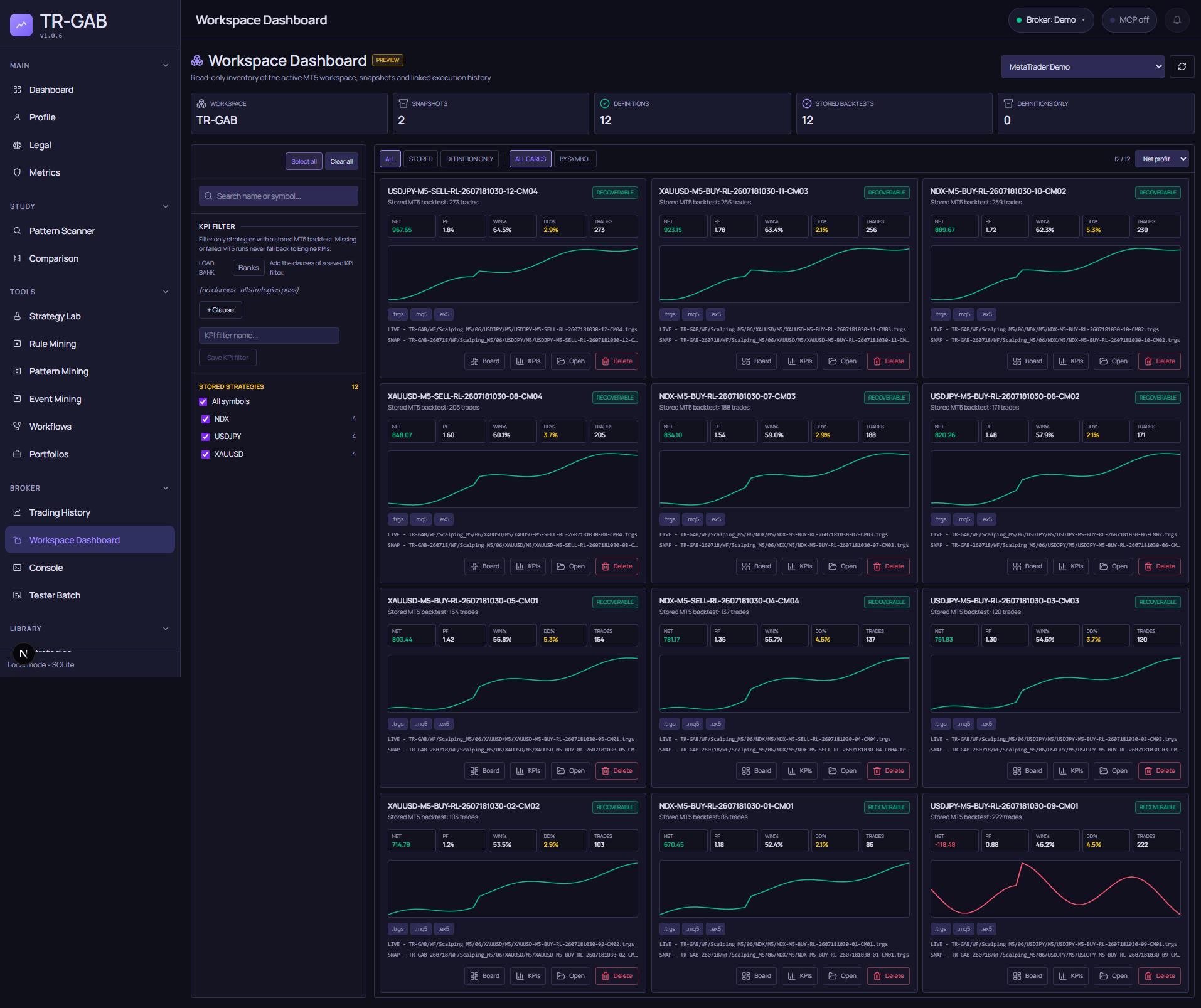
Workspace Dashboard captured automatically with deterministic documentation artifacts and stored MT5 results.
Read the workspace summary
The headline counters describe the selected MetaTrader source:
- Workspace identifies the primary live workspace.
- Snapshots counts the additional workspace snapshots discovered for that source.
- Definitions counts recoverable strategy definitions.
- Stored backtests counts definitions with stored MT5 broker-test evidence.
- Definitions only identifies strategies that can be recovered but do not yet have a stored MT5 run.
Use the source selector to inspect another configured MT5 installation. Changing source changes the workspace inventory; it does not merge unrelated broker installations into the same evidence set.
Bots first, evidence after
The screen loads in two steps. The inventory (the cards and the five counters) is painted as soon as
the workspace scan answers, in two or three seconds for a workspace of a few hundred bots. The strategy
logs and the broker curves are requested afterwards and each card shows a small loading logs spinner
until they arrive; if the logs cannot be read, the cards say logs unavailable with the reason and a
notice at the top offers to reload, and the inventory stays usable.
Choose the folder
A row under the counters shows the folder under MQL5/Experts being inventoried (TR-GAB by default)
and a change folder button. It opens the same folder browser as the Tester Batch: breadcrumbs,
subfolders with their counts of .mq5, compiled .ex5 and .trgs files, and a manual path. Entering
a subfolder (for example the WF folder where workflow exports live) reloads the inventory with that
base, and the folder is remembered per source.
Find the strategies that matter
The explorer supports several complementary views:
- Search by strategy name or symbol.
- Select one or more symbols from the stored-strategy tree.
- Switch between All, Stored and Definition only.
- View every card together or group cards By symbol.
- Sort the visible results by the available KPI order.
- Add KPI clauses directly or load a reusable filter from Banks.
KPI filtering is deliberately strict: Workspace Dashboard evaluates stored MT5 KPIs. A missing or failed MT5 run never falls back silently to internal-engine KPIs, so an engine curve cannot be mistaken for broker evidence.
Understand a strategy card
Each card keeps the evidence and the artifact together. When an MT5 result exists it shows the
stored Net Profit, Profit Factor, Win Rate, drawdown, trade count and equity curve. The file badges
confirm whether the recoverable .trgs, generated .mq5, compiled .ex5 and backtest evidence are
available. Live and snapshot paths show where the strategy was discovered.
The actions provide a short route into the next task:
- Board opens the board assigned to the workspace snapshot result.
- KPIs opens the complete TR-GAB KPI view for that strategy.
- Open opens the strategy workspace and its stored comparison tools without launching a new test.
- Delete uses a confirmation flow before removing the selected artifact.
A recoverable definition is not the same as a successful broker test. Use the Stored view when the decision requires MT5 evidence, and use Definition only to find strategies that still need a run.
Compare the engine with the broker
TR-GAB keeps two independent results for the same strategy: the internal engine backtest (what the miners and Labs compute) and the real MetaTrader Strategy Tester run (what the broker’s platform produced from the exported Expert Advisor). They are stored side by side and never mixed:
- In a workflow databank, each candidate carries its engine KPIs and, after an MT5 tester process, its stored MT5 KPIs. The detail view puts both columns next to each other (net profit, profit factor, win rate, drawdown, trades).
- In Tester Batch, every item of a run keeps the real MT5 trades and equity curve together with the engine trades of the same strategy. The replay view paints both on the chart so you can see where they diverge (fills, spread, session boundaries, pending-order expiration).
- Workspace Dashboard cards show the stored MT5 evidence only. Definitions without a stored run are labeled as such; an engine curve is never shown in their place.
Differences between the two are information: a strategy whose engine and MT5 curves agree is easier to trust than one that only looks good in the engine.
Through MCP
An agent can read the same evidence without the UI:
run_tester_batchlaunches the broker test for a folder of exported EAs;get_tester_batch_runpolls it and returns the MT5 KPIs per item.get_tester_batch_replay(runId, itemId)returns the real MT5 trades and equity of one item next to the engine trades and equity of the same strategy - the data for a trade-by-trade comparison. Candles and indicator series are omitted unless requested.list_workflow_run_itemsreturns, per candidate,kpis(engine) andmt5Results(stored broker KPIs) once a workflow tester process has run.list_tester_batch_runslists the history of broker runs with their parameters and engine mode.
A practical review routine
- Select the MetaTrader source whose workspace you want to inspect.
- Check the Definitions, Stored backtests and Definitions only counters.
- Narrow the inventory by symbol, search text or KPI clauses.
- Review the stored broker curve and quick KPIs on each card.
- Open KPIs for detailed analysis or Board for a custom visual summary.
- Use Open when you need the recoverable files or want to continue the strategy workflow.