Discover rule candidates without writing code.
Rule Mining scans price and indicator relationships over your selected market data. It turns the strongest single-condition candidates into strategies that you can inspect, filter, save and move through the rest of TR-GAB.
Define the search once Choose the market, execution assumptions, rule families and risk settings in one screen.
Filter while mining Apply reusable KPI clauses before weak candidates reach your results.
Continue in the platform Inspect, save, export or send selected rules to a Lab or Workflow for deeper validation.
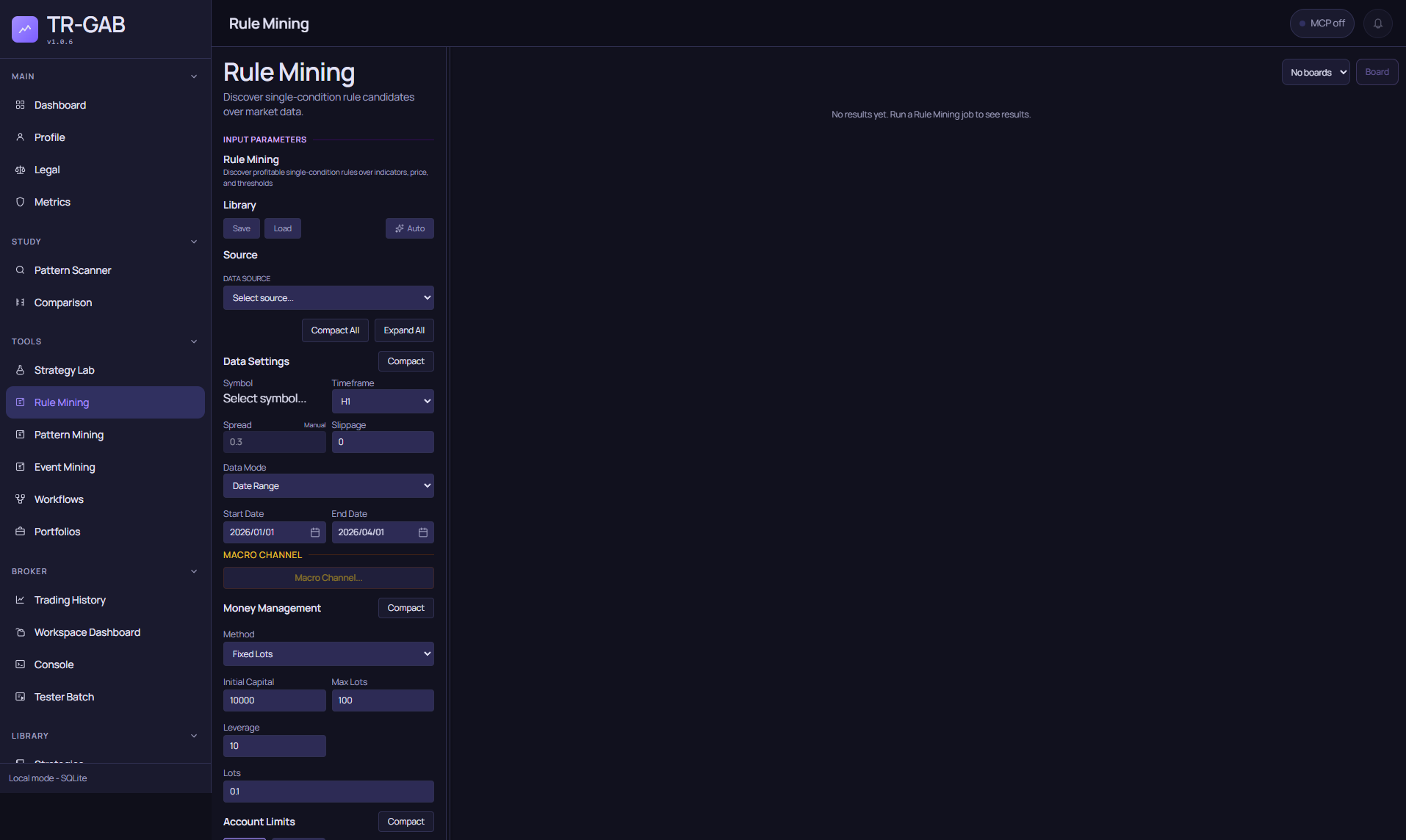
The current Rule Mining surface captured automatically in a safe, empty-result state.
Start with the market definition
Select the data source, symbol and timeframe that define the search. The date mode controls the historical window; spread, slippage and execution precision describe how that data should be tested. The same configuration also carries the settings that make a candidate executable rather than a pure signal:
- Money-management method, initial capital, leverage and lot limits.
- Account and trade limits.
- Trading windows and day or session exits.
- Stop-loss, take-profit, breakeven and trailing behavior.
- Commissions and swap when they are enabled for the selected broker data.
Use Save and Load in the Library to reuse a complete mining setup. Auto can generate a name from the current configuration.
Define what the miner may discover
Rule Mining searches one entry condition at a time. The scan can compare:
- An indicator against a numeric threshold.
- Price against an indicator.
- One indicator against another indicator.
Configure the allowed operators, indicator periods, thresholds and shifts to control the search space. Wider ranges explore more combinations; narrower ranges make a hypothesis faster to test and easier to explain.
If you drive the miner from an agent or a script, each family has its own keys (the same shape the screen sends). One line per kind:
[
  { "kind": "indicator_threshold",    "indicators": ["RSI"], "periods": [14], "operators": [">", "<"], "thresholds": [30, 70] },
  { "kind": "price_vs_indicator",     "priceField": "close", "indicators": ["EMA"], "periods": [20, 50], "operators": [">", "<"] },
  { "kind": "indicator_vs_indicator", "leftIndicators": ["EMA"], "leftPeriods": [10], "rightIndicators": ["EMA"], "rightPeriods": [50], "operators": [">", "<"] }
]
direction defaults to both sides. The full contract (regimes, session filter, costs and their units)
is in the MCP Server guide.
Optional market-regime constraints can focus the scan on contexts such as trend, momentum, overheated markets, choppiness, Hurst behavior or entropy. Use them only when they express part of the trading idea: every extra regime reduces the data available to each candidate.
If Mine from Bank is enabled, the miner uses the selected reusable condition bank instead of starting only from the screen’s rule ranges.
Choose how candidates enter
Entry order decides how a mined rule enters the market, and it is part of the mining contract:
- Market (default): enter at the open of the bar after the signal.
- Pending Stop (breakout): place a stop order a number of ATRs beyond the signal price.
- Pending Limit (pullback): place a limit order a number of ATRs back from the signal price.
- Sweep: try market, stop and limit for every candidate and keep the best.
Pending orders take an offset range (ATR multiples, swept like SL and TP) and an expiration in bars. The exported Expert Advisor places the same pending orders with the same expiration.
Easy mode and the Parameter Feasibility Scan
Parameter Feasibility Scan runs a fast, coarse pass over rule families, regimes and SL/TP so you can see where signals exist before committing to a full Discover. Easy mode loops that scan per timeframe and paints a compact map of zones (rule family by timeframe); click a zone to apply its configuration to the miner. Its Trade shape panel lets you fix a risk:reward ratio (or a range) and the app sweeps the ATR anchors for you. Both are available in the installed application.
Configure exits and minimum evidence
SL and TP ranges determine which ATR-based exit combinations are evaluated. The ATR period, signal shift and minimum-trade requirement are part of the mining contract. A candidate that does not meet the minimum evidence is not promoted simply because its small sample looks attractive.
Start with a constrained rule family and a meaningful minimum number of trades. Expand the search only after you can explain why the first candidates enter and exit.
Filter the output
Output filters evaluate candidate KPIs during the scan. Add individual clauses or load a saved KPI filter or group. This is the fastest way to keep only candidates that meet your baseline requirements for profit factor, drawdown, trade count, net profit or the other available metrics.
Mining filters are a first gate, not proof of robustness. A passing rule should still be tested on unseen periods, realistic costs and the target broker.
Run and review
Press Discover to create a Rule Mining job. The active job reports progress while it evaluates the configured search space. Past Jobs lets you reopen previous runs instead of repeating the same work.
The results table brings the candidate, its KPIs and its equity curve into one place. From there you can select candidates, inspect their configuration and continue with the actions exposed by the current platform: save them to the Strategy Library, group them, open them in the appropriate Lab, send them to a Board or export them for the configured broker.
When a mining returns nothing
A finished job with zero results is a valid answer, not an error. Read it in this order:
total_combinationsversuscompleted_combinations: if they match, every combination was evaluated and none survived the gates. If the total is zero, the scan produced no combinations (check the scan families, operators, periods and thresholds).- Minimum trades: every candidate must reach it in the research window. Shorter windows and session-restricted miners produce fewer trades; lower the minimum or widen the window.
- Output filters: they run during the scan. A tight profit-factor or drawdown clause on a short window removes everything.
- Trading window: the session filter is applied while mining, so a strategy restricted to eight hours a day has roughly a third of the trades of the unrestricted one.
Open the same configuration without the output filter to see the raw candidates, then add the gates back one at a time.
Recommended validation path
- Mine a focused family of rules over the research window.
- Inspect the condition, trade distribution and equity curve of each survivor.
- Retest on another period, symbol or precision without changing the rule.
- Apply robustness and walk-forward checks in a Workflow.
- Export and compare against the target broker before treating the candidate as deployable.
Rule Mining accelerates discovery. It does not turn an attractive historical curve into a promise of future performance.