Turn a trading idea into a repeatable pipeline.
Workflows connect mining, backtesting, validation and broker export in one ordered process. Build the flow once, run it again when the market, symbol or test window changes, and keep every result organized in databanks.
Build visually Add, reorder, enable or pause processes without rebuilding the whole pipeline.
Move candidates through databanks Route each process from an input bank to the same bank or a different output bank.
Finish on the target platform Export and test through the tools available for MetaTrader 5, NinjaTrader, cTrader and LEAN.
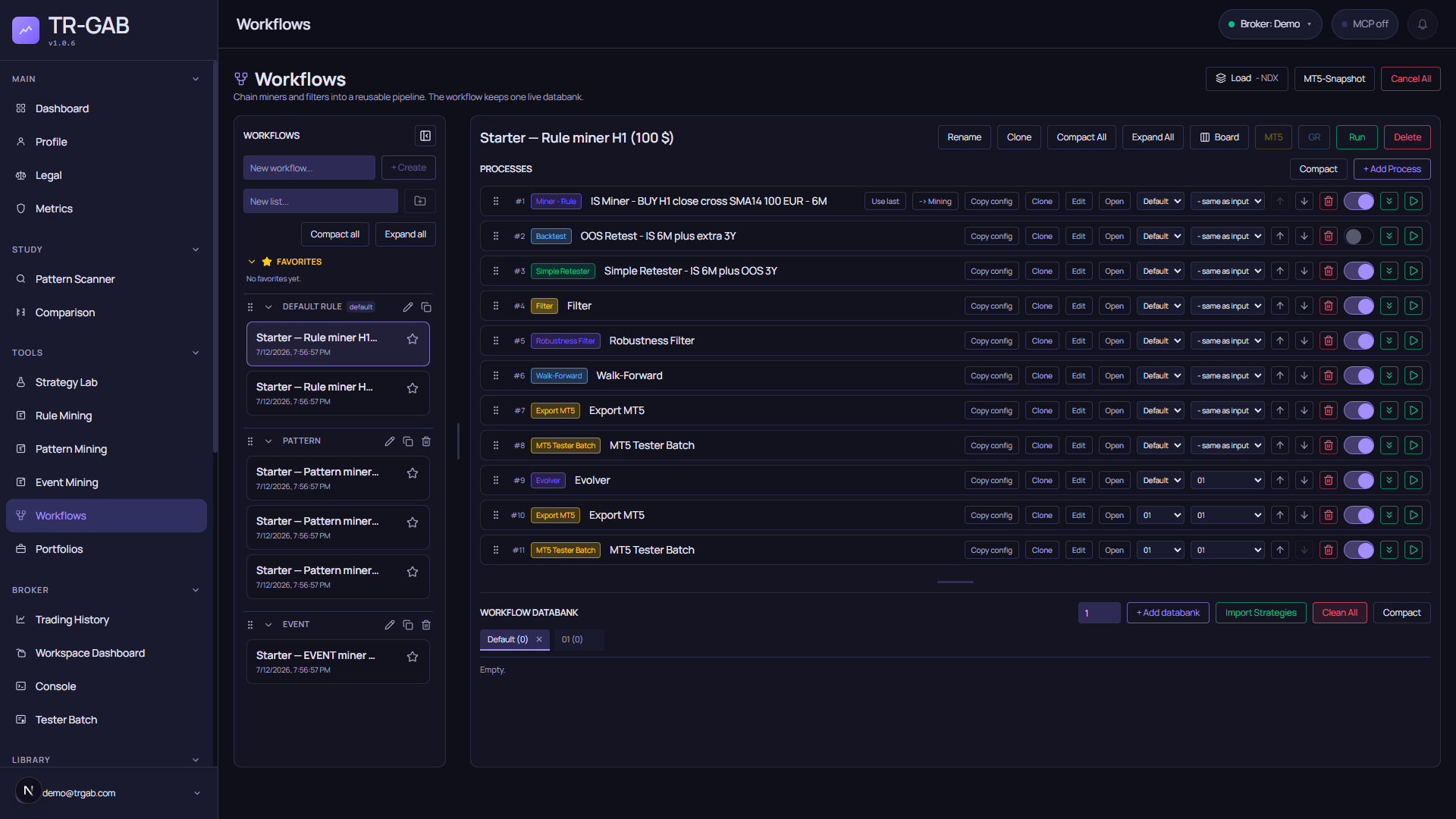
A real workflow captured automatically from the current development version of TR-GAB.
The model
Every workflow has three parts:
- Processes define what happens and in which order.
- Databanks hold the candidates read or produced by those processes.
- Runs preserve the execution state and the strategies produced by the pipeline.
Each process selects an input databank and an output databank. Choose same as input for an in-place step, or send the result to another databank to preserve stages such as raw candidates, filtered candidates and validated candidates.
Build and organize
Use the left sidebar to create workflows and organize them into lists and groups. A workflow can be marked as a favorite, renamed or cloned. Lists, groups and workflows can be reordered, compacted and expanded as the library grows.
The main toolbar provides the actions used most often:
- Rename and Clone the selected workflow.
- Compact All or Expand All to control dense pipelines.
- Board to inspect workflow results in the visual board.
- Run to execute every enabled process in order, or Cancel an active run.
- Use the platform action to export the workflow through the current default broker.
- Create an MT5 snapshot when a separate copy of the current Expert workspace is required.
Cloning a workflow copies its process configuration and databank structure, but not its strategy
items. Workflow templates can also be imported or exported as .trgwf: they include groups,
lists, workflows, process settings and databanks, never the generated strategies.
Process catalog
Generate candidates
The miners share the strategy inputs that matter across the product: source data, symbol, timeframe, date mode, execution precision, costs, money management, account limits, trade limits, trading windows, exits and output filters.
A miner can also carry a channel as its regime guard: the WORKFLOW button of every channel in Pattern Scanner creates, in the current list, a workflow with one Rule Miner whose macro guard is that channel and whose date range starts where the channel starts (the rest is the default Rule Miner configuration of this screen). Run it from here.
The default leverage of the money management is the leverage of the account of the source’s broker when one is known, and 1:100 otherwise; margin on CFDs without a fixed margin is the notional divided by that leverage, and an entry the margin rejects is reported with the account and leverage used.
Test and validate
Combine and improve
Export and test on a platform
Exporters create the native artifact for the selected platform. Tester processes have platform-specific configuration and results; they are not treated as interchangeable wrappers. The default broker controls the native destination used by workflow-level export actions.
Data and routing tools
- Update Symbols refreshes selected symbols already present in Market Vault.
- Loop repeats downstream work across configured symbol and timeframe passes.
- Move to Databank copies or moves the current candidates to another workflow databank.
- Clear empties the selected workflow databank.
Work with processes
Every process row exposes the same operating controls:
- Drag to change its order.
- Enable or disable it without deleting its configuration.
- Choose input and output databanks.
- Edit or open its full configuration.
- Copy its configuration, clone it, move it up or down, delete it or run it individually.
Configuration screens reuse the same editors as the Labs where possible. This keeps strategy settings consistent when a candidate moves from a miner or Lab into an automated workflow.
Inspect the databank
The workflow databank is the live result table. Add databanks, switch between them, import strategies and compact the section without leaving the workflow.
For each candidate you can inspect:
- Origin, name, symbol, timeframe and direction.
- Trades, win rate, risk/reward, profit factor, drawdown and net profit. A profit factor that does
not exist (no losing trade to divide by) is shown as
n/aand stored as null, never as 0 or 999;-means there are no KPIs yet. Filters treatn/aas undefined: it never passes a threshold by accident. - Equity curve and validation checks.
- Stored broker-test results when a tester process has run.
Rows can be sorted, selected in bulk, copied between databanks, renamed, opened in the appropriate Lab, added to a Board, exported, saved to the strategy library or deleted. Clean All is guarded by confirmation and clears the workflow databanks, not the strategy definitions stored elsewhere.
Run safely
Press Run to execute the enabled chain in process order. Progress is attached to the active run, so the UI can reconnect to long operations and show which process is currently running. Individual processes can also be launched with their row action when a full pipeline is unnecessary.
While a run is alive each process reports its state (pending, running, done, error; idle for disabled processes) and the miners report how many combinations they have evaluated out of the total, so a long mining stage can be told apart from a stalled one. Once the run finishes, every process goes back to idle.
Add Condition takes a list of conditions (indicator, price or number operands with an operator) and appends them to the entry of every candidate before re-testing it. Simple Retester takes the data selection to retest on (dates, symbol, timeframe, precision) and flags which of them override the candidate’s own settings; Robustness Filter perturbs each parameter with the configured probability, so with a one-condition rule raise it or most simulations will match the original.
Start with separate databanks for raw, filtered and final candidates. It makes every stage inspectable, prevents accidental in-place replacement and makes failed runs much easier to diagnose.
Process configuration reference
Each process has a fixed set of configuration keys. Unknown keys are rejected when the run starts,
with the list of valid keys in the error, so a typo never becomes a silent default. The same reference
is what the MCP tool add_workflow_process describes.
Filter
{ "kpiFilter": { "clauses": [{ "kpiId": "profit_factor", "op": ">=", "value": 1.2 }] }, "filterMode": "keep" }filterModeiskeep(default: candidates that do not match are removed) ordelete(candidates that match are removed).- It operates in place on the input databank unless the process has a different output databank. Route the output to another databank to keep the raw stage.
- KPI ids are
snake_casefrom the KPI registry (net_profit,profit_factor,max_drawdown_pct,win_rate,total_trades…). An unknown id fails the run instead of matching nothing, and a keep filter that matches zero candidates deletes nothing and reports a warning.
Robustness Filter
{ "simulations": 30, "probability": 0.10, "maxChangePct": 0.20, "seed": 1,
  "filterPayload": { "mode": { "type": "robustness", "level": 25 }, "clauses": [{ "kpiId": "profit_factor", "op": ">=", "value": 1.1 }] },
  "filterMode": "delete" }
Defaults: 30 simulations (cap 200), 10% of parameters perturbed by up to 20%, seed 1 (deterministic).
The Monte Carlo percentiles are computed for every candidate; without a filterPayload nothing is
judged and the row is stored as not evaluated. level selects which percentile of the simulated
distribution the clause is compared against.
Walk-Forward
{ "runs": 5, "oosPct": 0.20, "optimizerMetric": "sharpe", "gridLevels": 3, "gridMaxChangePct": 0.20, "gridMaxCombos": 27,
  "filterPayload": { "mode": { "type": "wfo", "period": "oos" }, "clauses": [{ "kpiId": "profit_factor", "op": ">=", "value": 1.0 }] },
  "filterMode": "delete" }
Defaults: 5 rolling windows with 20% out-of-sample each, re-optimizing on a small grid around the
current parameters. As with Robustness, a process without filterPayload measures but does not filter.
Miners share the strategy inputs of their Lab screens (data source, dates or date mode, costs, money
management, limits, trading window, exits, output filters). The trading window (sessionFilter) is applied
while mining, so a session-restricted miner produces different trades from an unrestricted one.
Runs, groups and comparisons
- A new workflow is created in the default group and list; move it afterwards if you organize by bank.
- Only one run is alive per workflow. Starting another while one is in progress is refused and does not cancel the live run; cancel explicitly if that is what you want.
- Simple Retester on another symbol: with
fixed_lots, 0.1 lots of GOLD and 0.1 lots of EURUSD are different risks, so the results measure contract size rather than the rule. For cross-symbol comparisons use a normalized sizing method (risk_pct_balanceorfixed_risk_amount).
A practical first workflow
- Add a Miner · Rule, Miner · Pattern or Miner · Event.
- Write raw candidates to a dedicated databank.
- Add Backtest or Simple Retester for the target range.
- Apply a Filter, then Robustness Filter and Walk-Forward.
- Route survivors to a final databank.
- Add the exporter and tester for the target platform.
- Run the pipeline, inspect its checks and save or export only the candidates you want.
This structure stays simple for one symbol and scales to multi-symbol research through Loop and explicit databank routing.